
Nissan Window Sticker by VIN
Get the Nissan window sticker by VIN to examine the complete details of the vehicle’s build, such as engine, transmission, safety ratings, and more! Click on the form below and enter any Nissan VIN to retrieve the window sticker in seconds.
As featured in




How to Get a Nissan Window Sticker
To get the Nissan window sticker, you can use the VIN and follow these instructions. Get the sticker in under a minute.
Enter the Nissan VIN
Check the driver’s side door jamb, engine bay, or the paperwork. Then, click the form and enter the Nissan VIN you want to check.
Submit the Form
Once the details are completed, click the button to submit the form.
Get the Window Sticker
Wait for a few seconds for the sticker to generate. Then, examine the preview page to see the specs and market value. You can then proceed to payment to get the full Nissan window sticker.
What Will You Get From the Nissan Window Sticker
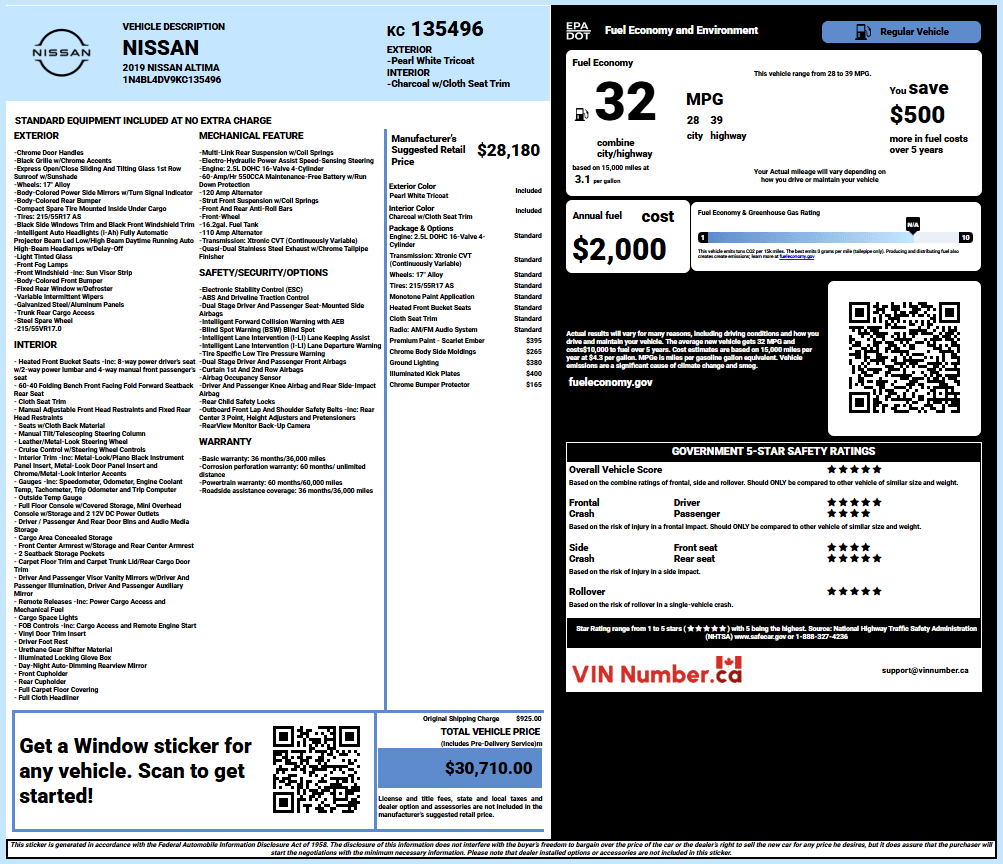
The Nissan window sticker can help identify the Nissan model, trim, engine, drivetrain, factory options, and packages, as it contains detailed records of the vehicle’s original configurations, interior/exterior colors.
Vehicle Description
Identifies the Nissan by model year, model, trim, body style, and drivetrain configuration. See if the car is an Altima, Sentra, Versa, Rogue, Pathfinder, Murano, Armada, Frontier, Kicks, or LEAF, along with the vehicle’s exterior and interior colors.
Standard Features
Lists equipment included with the specific Nissan trim. Depending on the model and year, this may include NissanConnect infotainment, touchscreen displays, wireless smartphone connectivity, Intelligent Key, heated seating, automatic climate control, LED lighting, and Nissan Safety Shield 360 features.
Options and Packages
See if it's an SV, SR, SL, or Platinum equipment, NISMO upgrades, Premium packages, Technology packages, panoramic moonroofs, upgraded wheels, Bose audio, towing equipment, and additional ProPILOT Assist features.
NHTSA Safety Ratings
Displays available NHTSA safety information for applicable Nissan vehicles. When ratings are available, this section includes government crash-test results.
Fuel Economy and Environment
Provides applicable EPA fuel economy information, including city, highway, and combined MPG ratings for eligible Nissan models. Electric vehicles such as the Nissan LEAF use electric efficiency and driving-range measurements instead of conventional MPG ratings.
Original MSRP and Total Price
Shows the Nissan’s Manufacturer’s Suggested Retail Price, along with the additional cost of factory-installed options and packages. Features such as NISMO equipment, Platinum upgrades, all-wheel drive, premium technology, larger wheels, upgraded audio, and towing equipment can increase the vehicle’s original price.
Interior and Exterior Colors
Identifies the Nissan’s exterior paint and interior color or trim. Depending on the model and trim, the sticker may identify cloth, leather-appointed, or leather seating, along with contrast stitching, metallic accents, premium trim finishes, and other interior details.
Engine and Transmission
See if the car has a turbocharged four-cylinder engine, a V6 engine, a hybrid or e-POWER system, and an electric powertrain. The sticker can also identify front-wheel drive (FWD), rear-wheel drive (RWD), or all-wheel drive (AWD) where offered.
Warranty Information
Check the Nissan factory warranty coverage that covered the vehicle when it was new. The warranty includes limited warranty coverage, powertrain protection, roadside assistance, and additional coverage for electric-vehicle or emissions-related components.
Finding a Nissan VIN
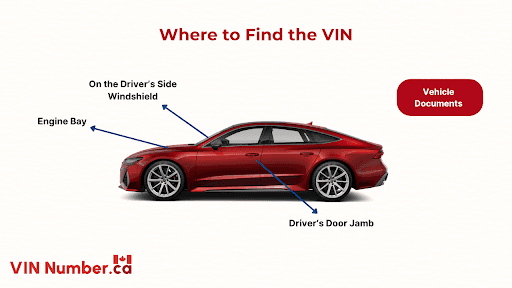
Finding the Nissan VIN is fairly easy; you can check a few spots on the vehicle and on its paperwork. The VIN is used as a unique identifier to differentiate cars from one another, even though they have the same model and trim.
- Windshield
- Driver’s Door Jamb
- Under the Floor Carpet
- Under the Hood
- Vehicle Documents
Why Do You Need a Nissan Window Sticker
A Nissan window sticker documents the vehicle’s original trim, powertrain, equipment, factory options, packages, and MSRP. It gives buyers, sellers, and owners a reference for how the Nissan was equipped when it was first sold.
Buyers
Checking the window sticker is useful when shopping across different trims of the Rogue, Altima, Sentra, Pathfinder, Frontier, or other Nissan models.
Confirm What Came From the Factory
The sticker can identify equipment such as NissanConnect infotainment, ProPILOT Assist, Intelligent Around View Monitor, heated seats, premium audio, remote start, towing equipment, and other available features.
Identify Trim-Specific Packages
Check the window sticker to see upgraded packages such as SV or SL equipment, Rock Creek features, Midnight Edition appearance packages, Premium Packages, Technology Packages, upgraded wheels, and towing equipment.
Check the MSRP
The MSRP and option costs show how much the Nissan was priced at when new. This helps buyers compare differently equipped vehicles, such as a Pathfinder Rock Creek versus a lower-trim Pathfinder or a well-equipped Rogue SL versus an SV.
Why Use Our Nissan Window Sticker Tool
The Nissan window sticker lookup tool lets users check available factory information by entering the vehicle's VIN. When records are available, the lookup can show the Nissan's original equipment, options, packages, specifications, and pricing.
Accurate Factory Data
Available records can provide details such as the Nissan's trim, engine, drivetrain, body style, standard equipment, factory options, packages, exterior color, interior, and original MSRP.
No Dealer Visit Required
You just need to enter the VIN to check available Nissan factory information. This can be useful when the original window sticker or factory paperwork is missing.
Wide Model Coverage
VINNumber.ca supports window sticker lookups for various Nissan models and model years, including classic models.
Affordable Window Sticker
Access available Nissan factory configuration information without visiting a dealership for basic research. The window sticker can provide a record for vehicle research, resale preparation, or ownership documentation.
Get a Window Sticker for All Nissan Models
Need a window sticker for other models? Use VINNumber.ca to retrieve the window sticker in seconds.
| GT-R | Z (370Z / 350Z) | Altima | Maxima | Sentra |
| Rogue | Pathfinder | Armada | Frontier | LEAF |
Verify Nissan CVT and Engine Information by Window Sticker
Before you take the car home, make sure to check the car’s CVT, engine, MPG, MSRP, and many more. Get the Nissan window sticker to see if it still matches the original build and specifications.
FAQs on Nissan Window Sticker by VIN
How can I find a Nissan window sticker using my VIN number?
To find a Nissan window sticker using the 17-character VIN, locate the VIN on the driver’s-side dashboard near the windshield or on the driver’s door-jamb label, then enter it into a dedicated window sticker lookup service.
Does a Nissan window sticker list the Intelligent Around View Monitor (I-AVM) feature?
Yes, a Nissan window sticker (Monroney label) will list the Intelligent Around View Monitor (I-AVM) system if the vehicle was originally equipped with this feature.
Can a Nissan window sticker verify the presence of the Rock Creek Package on a Nissan Pathfinder?
Yes, a Nissan window sticker can confirm whether a Nissan Pathfinder includes the Rock Creek Package or Rock Creek configuration, as it will be listed among the vehicle’s original equipment and options.
Can I find the NissanConnect services and infotainment features on a Nissan Monroney label?
Yes, a Nissan window sticker (Monroney label) includes available infotainment features and NissanConnect services, typically shown under the Audio & Entertainment or related equipment section.