
New Brunswick VIN Search - Check Vehicle Maintenance Records
If you plan to buy a used car in New Brunswick, be sure to check the VIN and see the vehicle history report to see damage history. Use the New Brunswick VIN search to check a vehicle’s specs and records.
Interesting Statistics on the New Brunswick Market
Buyer Preferences
Approximately 60% of car buyers in Canada now choose pre-owned vehicles over new ones.
Average Odometer Reading
In 2025, used vehicles sold in Canada had an average odometer reading of around 43,000–44,000 km.
Fatal Vehicle Collisions
New Brunswick recorded 77 fatal vehicle collisions in 2024.
Why You Should Use a New Brunswick VIN Search?
Buyers
Vehicle history reports help buyers review important records before purchasing and reduce the risk of hidden problems, pricing issues, or misleading seller information.
Verify Vehicle Information
Confirm the car’s year, make, model, and details match the seller’s listing and vehicle records.
Support Fair Price Negotiation
Use vehicle history and condition records to negotiate pricing with stronger supporting information.
Check Odometer Reading Accuracy
Review reported odometer readings and confirm they match the seller’s claimed reading.
Avoid Hidden Damage History
Check for previous accidents or damage records that may affect the vehicle’s condition and value.
What’s Included in a New Brunswick VIN Search?
Get the vehicle history report now and protect yourself from scams or bad records like accidents, damages, and lien/loan records. Here’s what you will get with a New Brunswick VIN check.
Vehicle Specifications
Review important factory information before buying. VIN records help confirm specifications, original equipment, and production details linked to the vehicle.
Core Vehicle Configuration
Shows engine type, fuel type, drivetrain, transmission, trim level, and factory-installed equipment linked to the vehicle.
Production and Identification Details
Displays model year, manufacturing information, and identification details used to confirm authenticity and factory specifications.
Vehicle Usage Records
Usage and ownership history help explain how the vehicle was previously used and whether it experienced heavier wear over time.
Personal and Commercial Usage
Shows whether the vehicle was privately owned or previously used for business, commercial, or fleet purposes.
Rental and Taxi History
Identifies previous rental or taxi use that may suggest a higher odometer reading and increased long-term wear.
Odometer Reading
Odometer readings help verify the vehicle’s reported distance and identify inconsistencies across historical records and inspections.
Recorded Odometer Entries
Displays historical odometer readings collected from inspections, registrations, and vehicle servicing records.
Rollback Detection Indicators
Flags unusual drops in odometer readings or inconsistent records that may indicate possible odometer tampering concerns.
Accident Records
Accident history may reveal previous collisions that affect the vehicle’s safety, condition, and future reliability.
Accident Dates and Locations
Lists when reported accidents occurred and where the incidents were officially documented.
Structural and Safety Indicators
Highlights damage involving airbags, suspension systems, frame structures, and other important safety-related components.
Damage Verification
Damage records help identify reported incidents that may impact the vehicle’s performance, condition, or overall value.
Collision and Structural Damage
Shows reported major or minor damage caused by collisions, impacts, or structural-related incidents.
Fire and Environmental Damage
Displays flood, fire, hail, and other environmental damage records connected to the vehicle.
Sales History Report
Review how many times the vehicle has changed ownership. Understanding its sales history offers insight into ownership patterns and helps assess the car’s usage and reliability.
Check the Sale Price
See the vehicle’s reported sale prices from previous listings or auctions. Comparing past prices helps evaluate market trends and determine if the current asking price is fair.
Check Vehicle Condition
Discover the vehicle’s condition during past sales, with ratings like outstanding, clean, or rough. This information helps gauge maintenance history, overall quality, and prior usage.
Auction Information
Auction records provide valuable insights into the vehicle’s past condition, pricing history, and status at the time of sale.
Overall Vehicle Information During Auction
Access auction details, including sale date, location, vehicle status, and final selling price. These records help understand the vehicle’s market history and condition.
Get Actual Auction Photos
View up to ten real photos from past auctions showing the vehicle’s condition at the time of sale. These images reveal any visible damage or modifications.
Warranty Status and Coverage
Warranty information helps determine whether manufacturer or extended protection plans are still active.
Active Warranty Coverage
Shows remaining factory warranty, roadside assistance eligibility, and available protection coverage details.
Covered Systems and Components
List systems and components currently protected under active manufacturer or extended warranty programs.
Theft Records
Verify if the vehicle has ever been reported stolen. Theft records help confirm legal status and prevent future ownership or registration issues.
Stolen Date
Check when the theft was reported to understand the timeline and whether the vehicle was recovered.
Stolen Location
See where the theft occurred for additional context and to support the vehicle’s history report.
Lien/Loan Records
Check if the vehicle has any active loans or liens to avoid unexpected financial obligations after purchase.
Loan Report
Determine if the vehicle is tied to an active financing agreement or an unpaid auto loan that could impact ownership transfer.
Lien Report
See if the vehicle has been used as collateral under a lien. Identifying an active lien helps prevent future legal or financial disputes.
How to Run a New Brunswick VIN Search?
To use the New Brunswick VIN search tool is easy; you just need to follow these simple steps and get it done in less than a minute.
Step 1: Enter the VIN
Fill in the form above with the VIN you want to check.
Step 2: Click the Search Button
After that, click the “Check VIN” button to begin the process.
Step 3: Get the Report
Check on the preview page to see complete information on the vehicle’s specifications. Then, proceed to payment to get the full vehicle history report.
Why Use Our New Brunswick VIN Search
When you choose our service, you get more than just a basic report. Here are the reasons why you need to use our New Brunswick VIN number lookup to get a vehicle history report.
Accurate Result
Get the vehicle history report in less than a minute. The data is collected from various sources in Canada, so you do not have to worry about the data reliability.
No Expiration Date
We provide unlimited access to vehicle history reports with no expiration. You can check the vehicle history report any time you want.
Affordable Vehicle Report
Choose a pricing option that fits your needs whether it’s a single search or a bulk package for dealerships and resellers.
Full Coverage Report
Our report provides you with more than basic vehicle specifications. You’ll get the in-depth report, including accident history, title brand status, theft records, and more.
Where to Find the VIN on a Vehicle
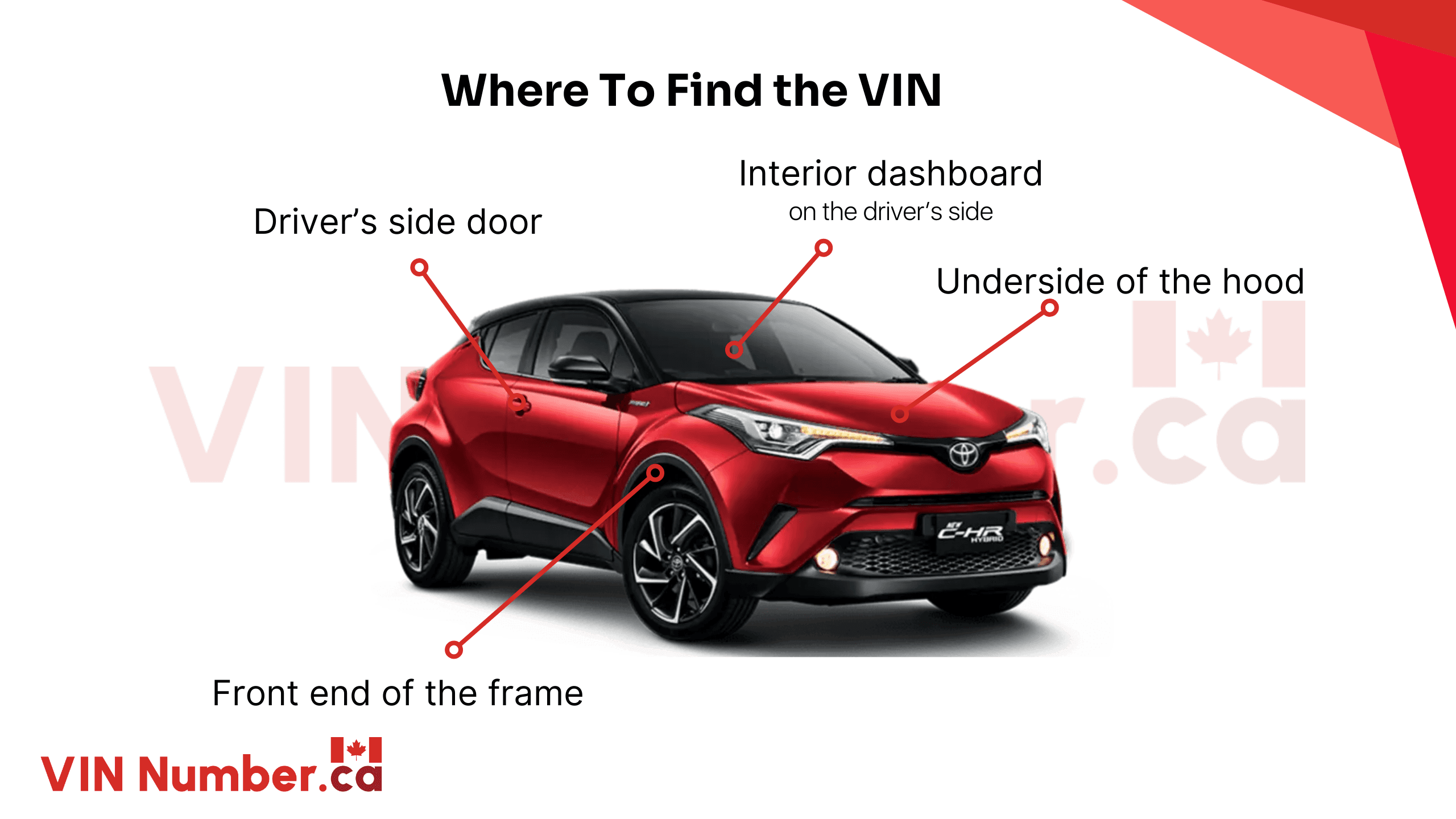
Finding a Vehicle Identification Number (VIN) is usually easy because car manufacturers place it in locations that are easy to access. Always compare the VIN on the vehicle with the VIN on official documents to help avoid VIN swaps or mismatched information.
- Driver’s Side Dashboard: This is the most common place to find the VIN. Look through the lower corner of the windshield on the driver's side.
- Driver’s Side Door Jamb or Frame: Open the driver's door and check the label or sticker attached to the door frame or latch area.
- Vehicle Registration and Insurance Papers: The full 17-digit VIN can also be found on ownership documents, registration papers, and insurance records.
- Engine Block or Firewall: Some vehicles have the VIN stamped directly on the engine block or on the firewall inside the engine bay.
- Other Locations: Check less common VIN locations like under the hood, near the spare tire area, or beneath the carpet under the driver’s seat.
Laws Related to Vehicle History Checks in New Brunswick
Understanding vehicle rules in New Brunswick helps buyers and sellers avoid paperwork problems, delays, and legal issues during ownership transfers.
Title Transfers in New Brunswick
Vehicle ownership transfers require fees and supporting documents before ownership can legally move to a new buyer.
Transfer Fees and Processing
Title transfers generally cost around $15 and can be completed through Service New Brunswick locations.
Required Documents
Buyers and sellers usually need identification, ownership papers, and a completed bill of sale.
Insurance and Registration
Drivers in New Brunswick must meet insurance requirements before legally registering and driving a vehicle.
Minimum Liability Coverage
Drivers must carry at least $200,000 in third-party liability insurance before operating a vehicle.
Additional Protection Options
Extra coverage may include protection for theft, vehicle damage, and other unexpected incidents.
Applying for Vehicle Titles
Vehicle title registration requires supporting paperwork and ownership documents before processing can begin.
Ownership Verification Documents
Applicants generally need ownership records, identification, and proof of purchase documentation.
Out-of-Province Vehicle Requirements
Vehicles imported from another province may require inspections before registration approval is granted.
Search Any VIN in New Brunswick and Get the Report
Get yourself a vehicle report before buying or selling a vehicle. Search any VIN in Canada now for a detailed vehicle report that gets you the real information about the vehicle.
FAQs on New Brunswick VIN Search
What is the VIN code for Canada?
The country code for Canada in a 17-character Vehicle Identification Number (VIN) is 2. This is the first character of the VIN and shows that the vehicle was assembled in Canada.
How to check a Canadian VIN number?
To check a Canadian VIN, first locate the 17-digit Vehicle Identification Number (VIN) on the driver-side dashboard, door jamb, or ownership documents. Then, use our VIN check service to access the vehicle history report.
What do Canadian VINs start with?
Vehicles assembled in Canada usually have a VIN that starts with the number 2. This first character is part of the World Manufacturer Identifier (WMI) and shows the vehicle’s country of assembly.
How to tell if a vehicle is US or Canada?
To see whether a vehicle was built in Canada or the United States, check the first character of the 17-digit VIN. 1, 4, and 5 usually indicate the US, while 2 shows the vehicle was assembled in Canada.
Is a VIN lookup safe to do?
Yes, checking or sharing a Vehicle Identification Number (VIN) is generally safe when using trusted platforms. A VIN provides public vehicle information and does not reveal personal or sensitive details.