
Best Tesla VIN Decoder in Canada
In the market to purchase a used Tesla? Use the Tesla VIN decoder to see the complete information of the car’s specs, trim, and the most recent market value to help you negotiate and set the selling price better.
What is a Tesla VIN Decoder?
A Tesla VIN Decoder is a tool used to decode the Vehicle Identification Number (VIN) of any Tesla vehicle, including both modern and supported older models. The Tesla VIN Decoder helps to find vehicle details such as trim level, drivetrain configuration, battery or powertrain information, model type, and factory specifications.
You can also view updated market value estimates based on vehicle condition and different seller types, including private and dealer listings. Always decode the Tesla VIN before you decide to purchase a used unit.
Why Decode a Tesla VIN?
Every Tesla vehicle comes with a unique Vehicle Identification Number (VIN). Decoding the VIN shows information about the vehicle, including its specifications, factory details, and identity.
Understand the Vehicle’s Specifications
A Tesla VIN decoder can show important details such as the model, battery configuration, drivetrain, trim level, and factory-installed features. This helps buyers and sellers confirm that the vehicle matches the advertised information.
Check Recent Market Value
Our Tesla VIN decoder helps to find the current market price based on factors such as seller type (private or dealership) and the condition of the vehicle. This can support fair pricing and negotiate better.
Check the Tesla Trim
Check the correct trim for whether the car is a Long Range, Performance, Plaid, or Standard Range. Knowing the trim level helps buyers understand the vehicle’s features and overall value.
Check the Vehicle Origin
A Tesla VIN decoder identifies where the vehicle was manufactured and assembled, such as factories in California, Texas, Germany, or the UK.
What Do You Get With Our Tesla VIN Decoder?
Our Tesla VIN Decoder offers different levels of service: a free VIN decoder and a paid VIN check. Whether you only need factory specifications or a complete vehicle history report, we can help to get the information you need.
Tesla VIN Decoder
The free Tesla VIN Decoder helps you view important vehicle details, including specifications, trim information, drivetrain configuration, and estimated market value.
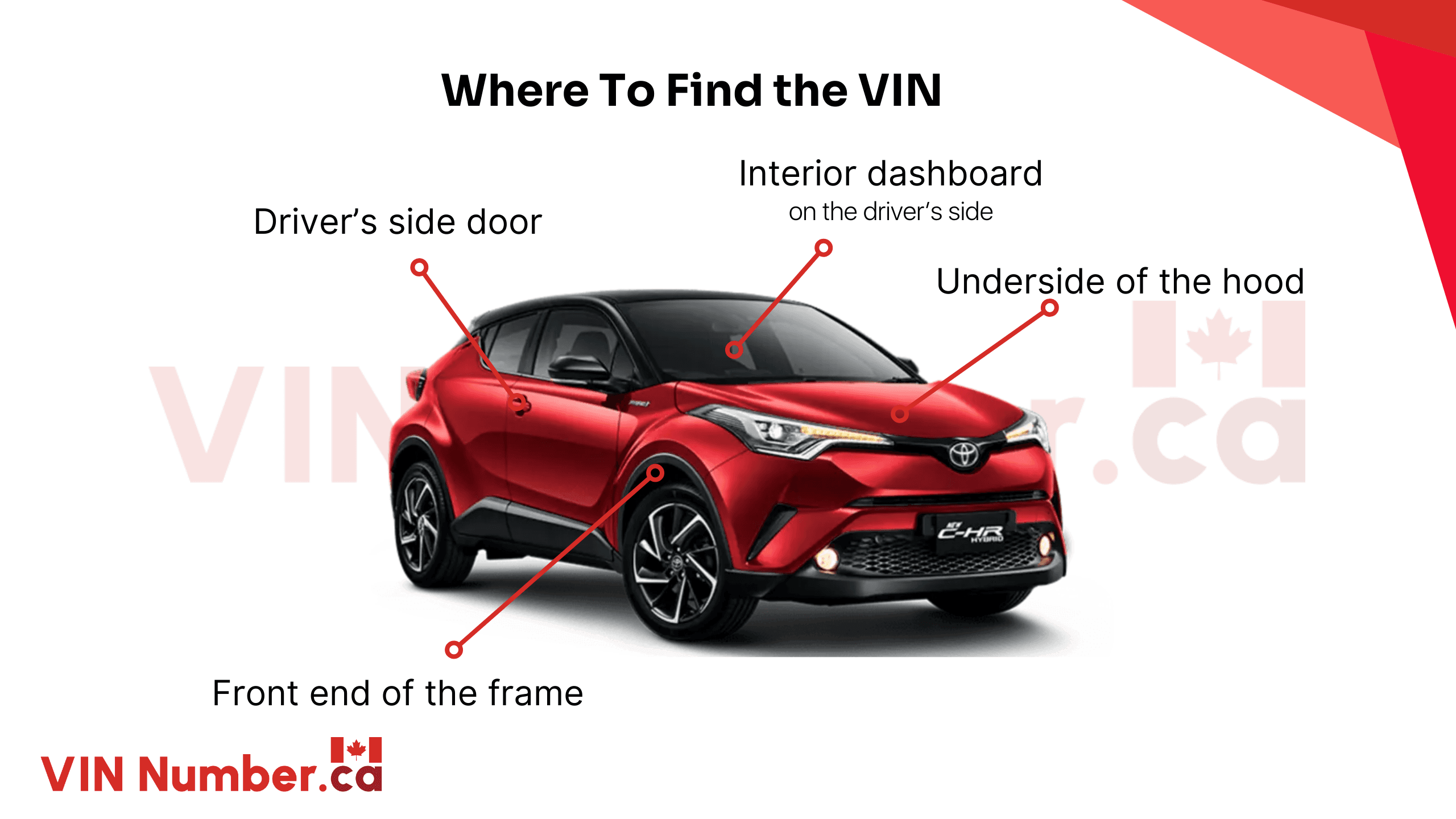
Where to Find the Tesla VIN?
Finding your Tesla Vehicle Identification Number (VIN) is simple. The VIN can be found in several places on the vehicle itself, inside Tesla’s software, and in official documents.
- Driver’s Side Windshield: Look at the lower-left corner of the windshield from outside the vehicle. The VIN is usually visible on the dashboard.
- Driver’s Door Jamb: Open the driver’s door and check the label attached to the door frame.
- Under the Hood: Some Tesla models may display the VIN on a sticker or identification plate inside the front trunk area.
- Vehicle Documents: Find the VIN on registration papers, insurance documents, or ownership records.
- Tesla App or Touchscreen: Tesla owners can locate the VIN through the Tesla app or directly on the vehicle touchscreen under Software or vehicle information settings.
How to Decode Tesla VIN?
We provide the best VIN decoder when it comes to decoding any Canadian VIN accurately. Follow these easy steps to perform a Tesla VIN Number Search.
Step 1: Enter the VIN
Type the Tesla 17-digit VIN into the form above. We also support classic car VINs ranging from 5 to 14 digits.
Step 2: Search VIN
Click the "Check VIN" button to begin the process.
Step 3: Check Tesla Specs Info
Check the complete specifications information, like fuel type and engine type, and see the most up-to-date market valuation information.
Case Study: James Saved from a Bad Deal
James found a great deal on a car that looked perfect — shiny, clean, and with a low odometer reading. But a quick vehicle history check revealed the following truth:
- 3 accident records
- 1 damage record
- 1 insurance loss record
- Salvage title
- Vehicle used as a lease
Outcome
These red flags showed that the car had been seriously damaged and written off by insurance. As a result, James avoided a risky buy that could have cost him thousands in repairs and legal issues.
How to Read a Tesla VIN Number?
A VIN (Vehicle Identification Number) is a 17-digit code that identifies a specific car. It has three sections:
WMI (World Manufacturer Identifier)
The first 3 digits identify Tesla and where it was built.
VDS (Vehicle Descriptor Section)
Digits 4 to 9 describe the model, motor type, safety features, and more.
VIS (Vehicle Identifier Section)
Digits 10 to 17 include the model year, plant code, and unique serial number.
Breakdown of a Tesla VIN Number
Each Tesla VIN has its own standard structure. Every VIN fragment represents components that build the vehicle. Take a look at the section below to see how a Tesla VIN is broken down.
1st–3rd Characters – World Manufacturer Identifier (WMI)
The first three characters identify the country of origin, manufacturer, and vehicle type. Some examples include:
- 5YJ = Tesla passenger vehicle manufactured in the United States
- 7SA = Tesla vehicle manufactured in the United States (Texas factory)
- LRW = Tesla vehicle manufactured in China
4th Character – Vehicle Model
The fourth character identifies the Tesla model. Examples include:
- Y = Model Y
- S = Model S
- 3 = Model 3
- X = Model X
5th Character – Body Type and Steering Configuration
The fifth character provides information about the body style and steering wheel configuration of the Tesla.
6th Character – Safety Equipment
This character identifies safety systems installed at the factory, such as seat belts, airbags, and pedestrian protection features.
7th Character – Battery or Powertrain Information
For older Tesla vehicles produced before 2013, the seventh character may indicate charging or power information. For newer models, it commonly represents battery configuration details.
8th Character – Motor Configuration
The eighth character identifies the motor setup and drivetrain configuration. Tesla uses different values to represent variations in motor and performance specifications.
9th Character – Check Digit
The ninth character is the VIN check digit. It is used to verify that the VIN is authentic and follows a mathematical validation formula.
10th Character – Model Year
The tenth character represents the vehicle's model year using letters and numbers. Examples include:
- A = 1980 or 2010
- B = 1981 or 2011
- 1 = 2001
11th Character – Manufacturing Plant
The eleventh character identifies the factory where the Tesla was assembled. Examples include:
- F = Fremont, California
- A = Austin, Texas
- C = Shanghai, China
12th–17th Characters – Serial Number
The final six characters form the vehicle’s unique serial number. These digits identify Tesla’s production sequence and distinguish it from other vehicles built with similar specifications.
What You Need to Know About Tesla?
Tesla has changed the automotive industry by making electric vehicles more mainstream. Known for advanced technology, software-focused features, and high-performance EVs, until now, the brand has become the top of mind for every EVs buyers.
- Founded in 2003: Tesla was established in 2003 and introduced its first production vehicle, the Roadster, in 2008, helping bring high-performance electric cars into the spotlight.
- A Leading EV Brand in Canada: Tesla remains one of the best-selling electric vehicle brands in Canada, with models like the Model 3 and Model Y continuing to attract buyers.
- Software Updates Over the Air: Unlike many traditional vehicles, Tesla models can receive over-the-air software updates, adding features, improving performance, and fixing issues without visiting a dealership.
- Strong Resale Value: Tesla vehicles often maintain competitive resale value, especially models equipped with premium options and advanced driver-assistance features.
- Safety and Recall Checks Matter: Tesla has issued recalls in Canada over software and safety-related concerns, making VIN checks important when shopping for a used model.
Find More with Our Tesla Window Sticker Service
Want even more detail? Our Tesla Window Sticker service provides a full breakdown of your Tesla’s original specs, factory options, software packages, safety ratings, and more. It’s perfect for resale, insurance, or simply knowing exactly what you own.
Decode Any Tesla VIN
Use our tool to decode any Tesla VIN from different models, trim, and year!
- Model S
- Model 3
- Model S Plaid
- Model 3 Performance
- Model X
- Model Y
- Model X Plaid
- Model Y Performance
- Roadster
- Cybertruck
- Semi
- Roadster 2023
Decode VIN for Other Makes
Use our VIN decoder tool to decode other makes' VINs to see the complete information on vehicle specifications and get the latest market pricing information.
FAQs About Tesla VIN Decoder
Is a Tesla VIN lookup free?
Yes, decoding a Tesla VIN to view factory specifications, build details, and verify vehicle features is completely free. Use our Tesla VIN Decoder to instantly access detailed vehicle specifications and important factory information.
Can I look up my VIN for free?
Yes, you can look up a VIN for free. Free VIN tools can show factory specifications, open recalls, and basic vehicle information. However, complete history reports, including title records, accident history, and odometer issues, usually require a paid service. You can access a full vehicle history report for only C$25.00.
Can a Tesla VIN identify the model?
Yes, a Tesla Vehicle Identification Number (VIN) can identify the exact model. The VIN contains information that helps determine whether the vehicle is a Model S, Model 3, Model X, or Model Y. Use our Tesla VIN Decoder to quickly identify your Tesla model.
Can I use a VIN to find car details?
Yes, a Vehicle Identification Number (VIN) can be used to check a vehicle’s details. The 17-character VIN acts like a unique fingerprint and can reveal important information such as specifications, trim, manufacturing details, and more. Use VINNumber.ca to access complete vehicle information quickly and easily.
How do I check what model my Tesla is?
To find out exactly which Tesla model you own, check the Software menu on your vehicle touchscreen or decode the Vehicle Identification Number (VIN). You can use our Tesla VIN Decoder to quickly identify the model and view detailed vehicle information.